Connection Pool Exhaustion
Postgres doesn't hand out lightweight handles. Every client connection gets its own backend process, and each one costs memory, a file descriptor, and a fork. That's why applications pool connections — and why running out of them takes down the app long before the database looks unhealthy.
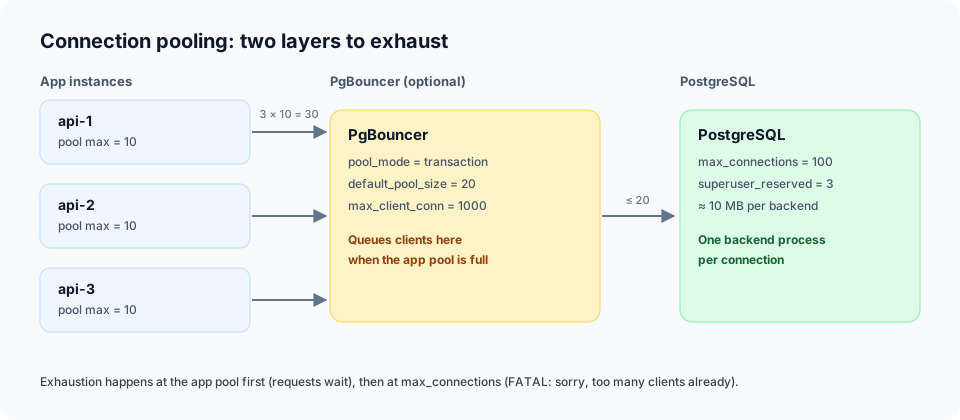
Two layers of pooling
There are two limits in play, and they fail differently:
- The app-side pool. A fixed number of clients (
maxinnode-postgres,maximumPoolSizein HikariCP). When all of them are checked out, callers wait, then time out. - The server-side limit. Postgres accepts at most
max_connectionsclients (default100, minussuperuser_reserved_connections, which defaults to3).
Both have to be sized together. Ten instances with a pool of 20 each want 200 connections — double what a default Postgres will accept.
What it looks like
From the application, the first symptom is usually a client timeout:
timeout exceeded when trying to connect
From Postgres, the log shows the server refusing new backends outright:
FATAL: sorry, too many clients already
FATAL: remaining connection slots are reserved for non-replication superuser connections
If you're running PgBouncer, it has its own wall to hit:
no more connections allowed (max_client_conn)
Notice that CPU and memory can look completely normal the whole time. The database isn't struggling — it's full.
Diagnose it with pg_stat_activity
Start with the state breakdown for your database:
SELECT state, count(*) AS connections
FROM pg_stat_activity
WHERE datname = current_database()
GROUP BY state
ORDER BY connections DESC;
The states that matter:
active— doing work, expected.idle— checked out by the app but not doing anything. Fine in moderation, suspicious in bulk.idle in transaction— a transaction was opened and abandoned. This is the one that hurts. The backend holds locks and blocks vacuum while it waits.
Find the oldest non-idle sessions:
SELECT pid,
       application_name,
       state,
       now() - state_change AS state_age,
       left(query, 60) AS query
FROM pg_stat_activity
WHERE datname = current_database()
  AND state <> 'idle'
ORDER BY state_change
LIMIT 20;
Check how close you are to the ceiling:
SHOW max_connections;

SELECT count(*) AS used
FROM pg_stat_activity;
And break connections down by service so you know who's hogging them:
SELECT application_name, state, count(*) AS connections
FROM pg_stat_activity
GROUP BY application_name, state
ORDER BY connections DESC;
That last query is only useful if you set application_name in the connection string. Do it — it turns an anonymous crowd of backends into a chart.
Common causes
- Leaked clients. A request calls
pool.connect()and throws beforerelease(). Every failure permanently shrinks the pool. - Idle in transaction. A transaction is opened, then the code awaits an HTTP call, a queue, or a slow computation. The backend is pinned the entire time.
- Slow queries and lock waits. One missing index or one long lock holder keeps connections checked out for everyone else.
- Too many instances. Horizontal scaling multiplies the pool. A config that was safe with 2 pods is fatal with 20.
- PgBouncer misconfiguration. Session pooling with a large client base pins server connections. Transaction pooling is usually what you want, but session-level features like prepared statements need care.
Fixes
Create and size the pool with pg
import { Pool } from "pg";

export const pool = new Pool({
  connectionString: process.env.DATABASE_URL,
  max: 10, // clients this instance may hold at once
  connectionTimeoutMillis: 5_000, // stop waiting for a free client after 5s
  idleTimeoutMillis: 30_000, // close clients that sit unused
  application_name: "api", // makes this instance visible in pg_stat_activity
});

pool.on("error", (error) => {
  console.error("Unexpected error on idle client", error);
});
max is per process, so the real demand on Postgres is instances × max. connectionTimeoutMillis turns an indefinite hang into a fast, visible failure instead of a request that stalls until the client gives up. And never create new Client() per request — that's the opposite of pooling.
Close the pool cleanly when the process exits:
process.on("SIGTERM", async () => {
  await pool.end();
});
Release connections, always
const client = await pool.connect();
try {
  await client.query("UPDATE jobs SET status = $1 WHERE id = $2", ["done", id]);
} finally {
  client.release();
}
If you don't need a transaction, skip the client entirely and use pool.query() — it checks out and releases for you.
Add server-side timeouts
These are the highest-leverage settings you can apply, because they cap the damage from any single bad request:
ALTER DATABASE app SET statement_timeout = '5s';
ALTER DATABASE app SET idle_in_transaction_session_timeout = '30s';
ALTER DATABASE app SET lock_timeout = '2s';
idle_in_transaction_session_timeout alone resolves a surprising number of "mystery" exhaustion incidents, because it kills the abandoned transactions that caused them.
Do the capacity math
Keep headroom for migrations, psql, and monitoring:
instances × pool_max + reserved + headroom < max_connections
If the numbers don't fit, either lower the pool size per instance or put PgBouncer in front so many app clients share a smaller number of server connections.
Put PgBouncer in front
In transaction mode, PgBouncer lets hundreds of app clients share a modest number of Postgres backends. Size default_pool_size to what Postgres can actually handle, and max_client_conn to what your fleet can open. Remember: PgBouncer moves the queue, it doesn't remove it.
Monitor before it pages you
Alert on connection usage crossing ~80% of max_connections, and on the age of the oldest idle in transaction session. Both are cheap queries against pg_stat_activity, and both give you warning that a timeout error never will.
The takeaway
Connection pool exhaustion is almost never a Postgres bug. It's a finite queue being treated as an infinite resource — usually because a connection leaked or a transaction was left open. Instrument the pool, bound the timeouts, and do the multiplication before you scale out.